

Appearance

Using a custom top bar with Topol Plugin
Hiding the built-in top bar lets you drive the editor from your own branded buttons, calling methods on the editor instance and reacting through callbacks, so the editor blends into your app's UI.
Removing the default top bar
Hide the built-in top bar with a single option in TOPOL_OPTIONS:
ts
removeTopBar: true,Driving the editor from your own buttons
With the top bar gone, actions like save, undo, and preview are triggered by calling methods on the instance returned by TopolEmailEditor(). To save, call:
ts
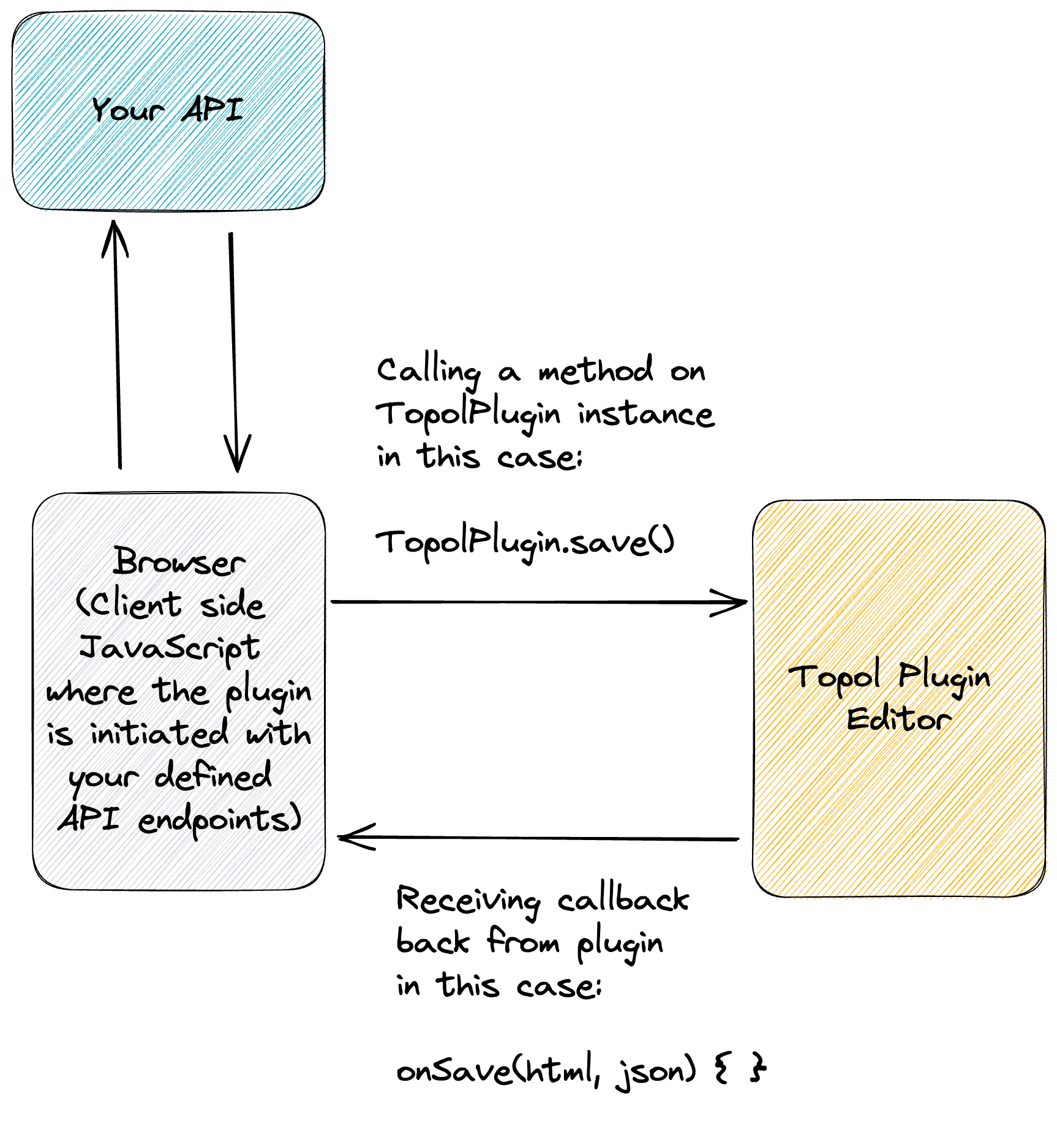
editor.save();That runs the editor's save and fires your onSave callback with the current template data. The returned Promise settles once the save has finished, including your onSave Promise, and it rejects if a save is already running (see one save at a time). If the editor's own Ctrl/Cmd+S should not start saves either, add the disableShortcuts option.
Setting up callbacks
Callbacks passed next to config let your app react when an action completes. onSave and onSaveAndClose receive the same payload object: the template JSON (json), the rendered HTML (html), the language mutations (mutations, an array of { code, primary }), and the synced-sections usage (syncedSections).
ts
const editor = TopolEmailEditor({
  config: {
    authorize: {
      apiKey: "YOUR_API_KEY",
      entityId: "YOUR_USER_ID",
    },
    removeTopBar: true,
  },

  onSave({ json, html, mutations, syncedSections }) {
    // Save json and html to your database
  },

  onSaveAndClose({ json, html, mutations, syncedSections }) {
    // Save the data, then close or redirect from the editor
  },

  onUndoChange({ count }) {
    // The undo history changed; count is the number of steps that can be undone
  },

  onRedoChange({ count }) {
    // The redo history changed; count is the number of steps that can be redone
  },
});

editor.render("#app");
With the top bar removed, save() is the method that runs onSave. There is no public method for save-and-close, but the built-in Ctrl/Cmd + Shift + S shortcut still runs onSaveAndClose.
The diagram below traces the save flow:
Methods you can call from a custom top bar
Save:
editor.save()Save a specific language mutation:
editor.save({ langCode: "en" })Undo:
editor.undo()Redo:
editor.redo()Open or close preview mode:
editor.togglePreview()Switch the preview between mobile and desktop width:
editor.togglePreviewSize()
Combining with mobile-first
The editor also supports a mobile-first editing experience, and the mobile and desktop views can be switched from your own buttons alongside a custom top bar. The mobile-first guide covers the methods for that.