

Appearance

Working with API
Features that persist data (autosaves, comments, saved blocks, image uploads) read and write through endpoints you implement. The api option tells the editor where those endpoints live, one URL per action; the editor then calls your backend directly from the iframe.
For a better understanding of the communication, refer to the diagram below:
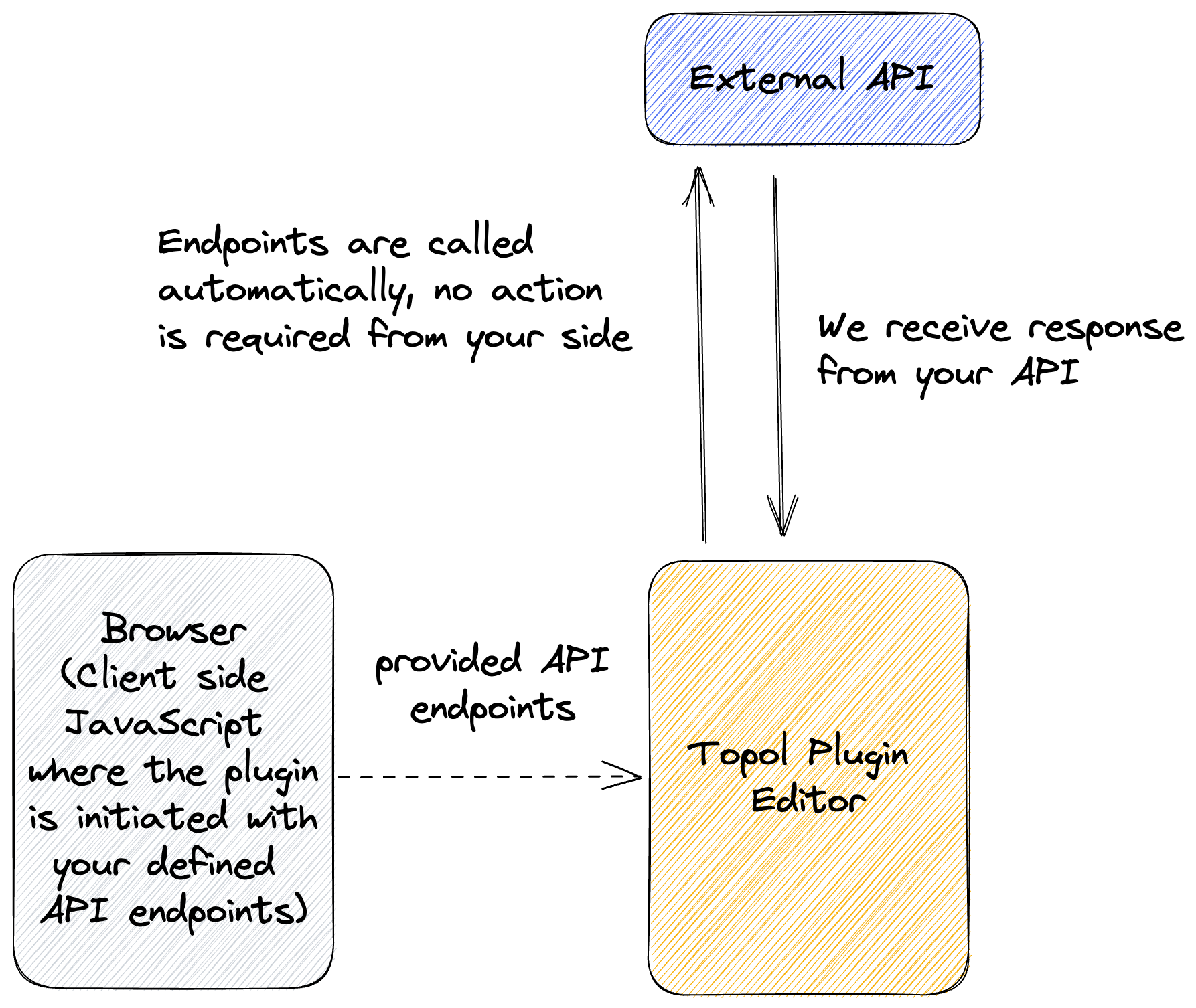
Setting up API endpoints
The api option goes into the configuration next to authorize:
js
const TOPOL_OPTIONS = {
  authorize: {
    apiKey: "YOUR_API_KEY",
    userId: "YOUR_USER_ID",
  },

  api: {
    AUTOSAVES: "https://your-domain.com/autosaves",

    FOLDERS: "https://your-domain.com/folders",
    IMAGE_UPLOAD: "https://your-domain.com/image-upload",
    IMAGE_EDITOR_UPLOAD: "https://your-domain.com/image-editor-upload",

    CONVERSATIONS: "https://your-domain.com/conversations",
    COMMENTS: "https://your-domain.com/comments",

    SAVED_SECTIONS: "https://your-domain.com/saved-sections",
  },
};

const LPE = LandingPageEditor({ config: TOPOL_OPTIONS });
LPE.render("#landing-page-editor");
Available endpoint keys
| Key | Backs |
|---|---|
AUTOSAVES | Autosave listing, creation, and detail. Learn more |
CONVERSATIONS | Comment conversations. Learn more |
COMMENTS | Individual comments (edit, react, mark read, delete). Learn more |
FOLDERS | File manager folder listing and management. Learn more |
IMAGE_UPLOAD | Image uploads from the file manager. Learn more |
IMAGE_EDITOR_UPLOAD | Saving images edited in the built-in image editor. Learn more |
SAVED_SECTIONS | Saved blocks and synced sections. Learn more |
PREMADE_TEMPLATES | Your own premade templates library. Learn more |
PREMADE_TEMPLATE_CATEGORIES | Categories for the premade templates library. Learn more |
PREMADE_TEMPLATES_KEYWORDS | Keywords for premade template search. Learn more |
GENERATE_META | Overrides the endpoint used for AI metadata generation. Learn more |
One more key is accepted but should not be relied on: SAVE (posting rendered HTML to your server on every save) is a legacy behavior kept only for older integrations.
Three things to know before implementing:
- The server has to allow requests from the editor's origin, otherwise the calls fail on CORS.
- The URLs above are just examples; name the endpoints whatever you want.
- The URL you supply is the endpoint base. The editor appends resource identifiers to it: fetching a single conversation calls
{CONVERSATIONS}/{conversation_key}, and fetching one autosave calls{AUTOSAVES}/{autosave-key}.
The exact request and response shapes live in the feature articles: Autosaves, File Management, and Collaboration & Comments.
Securing API Endpoints
When your endpoints require authentication, the apiAuthorizationHeader option attaches authorization headers to the editor's outgoing requests. The headers go to every request the editor makes except those to Topol's core rendering and authorization API (api.topol.io), Giphy, and Vimeo, so your custom endpoints receive them and Topol's own services do not.
One caveat: the default premade-templates endpoints are hosted on app.topol.io and are not on that exclusion list, so they carry your headers too. Since the string form of the option sets Authorization, it replaces the key those endpoints expect. If you use both, either host your own template endpoints or use the object form with a custom header name.
There are two approaches:
1. Using a standard Authorization header
The most common method (e.g., with Bearer tokens):
js
apiAuthorizationHeader: "Bearer your_token";This configuration results in HTTP headers like:
Authorization: Bearer your_token
2. Using custom header names
If the backend expects a non-standard header, or several headers at once, define them as an object. Each key/value pair becomes its own header:
js
apiAuthorizationHeader: {
  "X-Auth-Token": "your_custom_token",
  "X-Tenant": "acme"
}
This configuration sends:
X-Auth-Token: your_custom_tokenX-Tenant: acme
Updating Authorization Tokens Dynamically
When the token needs a refresh (after expiration or user re-authentication), the updateApiAuthorizationHeader() instance method swaps it without reinitializing the editor:
js
const LPE = LandingPageEditor({ config: TOPOL_OPTIONS });
LPE.render("#landing-page-editor");

// later, when the token rotates:
LPE.updateApiAuthorizationHeader(new_token);
new_token takes the same two shapes as the option:
js
// either string format (standard)
LPE.updateApiAuthorizationHeader("Bearer new_token_value");
// or object format (custom header)
LPE.updateApiAuthorizationHeader({
  "X-Auth-Token": "new_token_value",
});
All subsequent API calls use the updated header values.